



Campaigns are a flexible, native object that allows you to track your engagement efforts and performance in Salesforce. A lot of the resources out there still refer to the Classic UI but Lightning has changed the ways we Interact with Campaigns. This blog post will provide an overview of Campaigns in Salesforce for the Lightning user.
This post is the first in a series of three blog posts about Salesforce Campaigns in Lightning. The second post, Customize Campaigns in Lightning, will cover in more detail how to customize campaigns, and the third post, Manage Campaign Members in Lightning, walks you through how to manage Campaign Members step-by-step.
I spent three years implementing marketing analytics apps and guiding customers on Campaign best practices in Salesforce while I worked for Full Circle Insights, and a year working on Lightning projects in my current position consulting with Slalom. In this post you’ll learn more about customizing and using Campaigns in Lightning.
Note: This blog post will not cover how Salesforce Campaigns interact with Marketing Automation Tools because I assume you don’t want to read a novel, you want to read a blog post.
Salesforce Campaigns Overview
Campaigns are a great tool for tracking engagements in Salesforce. You can use them to track and analyze Leads and Contacts in Salesforce that engage with your emails, ads, social media posts, assets, website, and events, etc. Campaigns allow you to track ROI of your marketing, or other departments, (Campaigns aren’t always used solely by marketing. Sales may use outbound calling campaigns, and Nonprofits are even more nuanced than that.) efforts to engage with your target audience. Campaign reporting allows you to track Campaign ROI, pipeline, and closed deals, as well as different types of interactions with your various campaigns.


Campaign: an outbound marketing project that you want to plan, manage, and track within Salesforce.
Some common uses for Campaigns:
- Tracking event invites, registrations, and attendance
- Tracking Lead nurturing email sends, opens, and clicks
- Tracking asset downloads or form submissions on your website


You can click on the Campaigns Tab to get started or, if you don’t see it click on the app launcher and click on Campaigns.
Note: with the Spring 18′ release you are now able to customize your tabs in Lightning so you can add the Campaigns tab to your primary app if it’s not already there.
For more on this subject, check out part two of this series: Customize Campaigns in Lightning
Campaign Members and Member Status
Campaign Member records store data about specific interactions between Leads and Contacts and your Campaigns. I like to think of it like this: Leads and Contacts represent people, a Campaign represents a way to engage with those people and a Campaign Member represents a specific engagement.


For example:
You are holding your annual conference. You want to invite the Queen of England (a Lead) and Oprah Winfrey (a Contact). Your conference is very fancy and expensive. You create a Campaign for the conference called “Fancy Shmancy Conference $$$” and you Invite The Queen and Oprah.
Each invite generates a Campaign Member record with a relationship to the Campaign and the Lead or Contact. So one Campaign Member record shows that Oprah was “Invited” to Fancy Shmancy Conference $$$ and one Campaign Member record shows that The Queen was “Invited” to Fancy Shmancy Conference.
Campaign Members are an extra special object because they follow a Lead when it gets converted to a Contact so you can see all a person’s engagements from Lead gen to Opportunity close and beyond. Just like with Campaigns, you can customize both the fields and page layouts of Campaign Members to meet your business needs.
Campaign Members can be viewed on a Lead or Contact’s Campaign History related list.


On the Campaign, you can see all the Campaign Members in the Members related list.
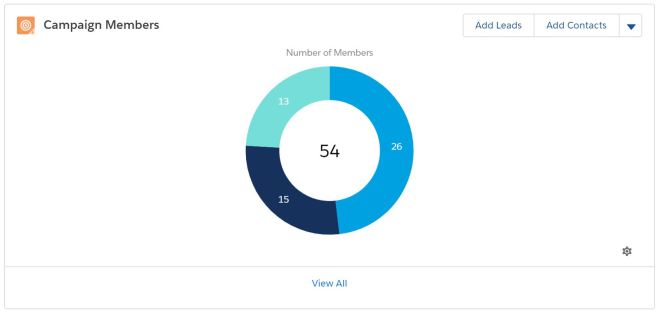

Campaign Member Status
If we look back at the example of inviting the Queen and Oprah to our Fancy Shmancy Conference, “Invited” is the Campaign Member Status. The Campaign Member Status values enable you to track the current level of involvement each person has with your Campaign. As you are thinking about and planning your Campaign strategy, choosing your status values wisely is of the utmost importance.
Some examples:
- Artem the Wizard “Waged Battle Against” The Dragon Army
- Beyonce “Danced” at Cool Kids Secret Dance Party
- Foghorn Leghorn “escaped” from a Chicken Hawks Trap
Some boring but actually relevant examples:
- Beth H “Downloaded” an Ebook – Salesforce Success Secrets
- Patrick T “Attended” a Webinar – The 10 Keys to Code
- Zach N “Clicked” an Email – Nonprofit Newsletter
For more on this subject, check out part three of this series: Manage Campaign Members in Lightning
Campaign Member Management
You can manage your Campaign Members in several ways. You can import a list of new Leads or Contacts or a list of existing Leads and Contacts and add them to Campaigns via Import Wizard or the Dataloader. You could also use a product like People Import to Create new or find existing Leads and Contacts and add to Campaigns. For Leads and Contacts that already exist in your org, you can add Campaign Members from a Report, Lead or Contact List View, or an individual record.
Note: Many companies use a Marketing Automation tool to add Leads and Contacts to Campaigns and update Campaign Member Status but like I said before, I won’t be covering that in this post.
Reporting on Campaign Performance


This is another extensive topic. so here are some tricks and gotchas for campaign reporting:
- Use the Campaigns with Campaign Members Report Type to report on all fields on the Campaign and Campaign Members. You can basically slice and dice and summarize this information however you want, but I recommend you begin by summarizing by Campaign Name, Member Status, Responded (True or False), and relevant date fields.
- Pipeline and Closed Deals – If you create an Opportunity upon Lead conversion, Salesforce automatically populates a field on the Opportunity called Primary Campaign Source with the most recent Campaign Member associated to a Lead before conversion, whether or not the Member Status is considered “Responded”. The most recent Campaign is determined by the Campaign Member First Associated Date. This most recent Campaign interaction is usually referred to in marketing speak as the “Last Touch”. If you are not creating Opportunities from Lead Conversion this field will be blank unless you build or purchase additional automation to set this field.
- If you want to report on how multiple engagements with Campaigns influence Opportunity Pipeline and Closed Deals you should look into Salesforce Campaign Influence or a product that offers Campaign Attribution solutions. It is easier to use these technologies if you are reliably using Contact Roles on Opportunities, but as the Account Based Marketing trend has grown so have solutions offered for Account based Campaign Attribution.
- Campaign ROI – In order to get this metric you should enter cost information into the standard Actual Cost field on your Campaigns, however this number can be a bit sketchy out-of-the-box without reliable Campaign Attribution because you’re just looking at revenue generated via Last Touch so a single Campaign is getting the ROI credit for all of that opportunities revenue rather than multiple engagements over time. For example, if a Lead is sourced via a Facebook ad but then attends a Webinar prior to conversion, the Webinar would get credit for 100% of revenue generated from the Opportunity.
- If you are using Campaign Hierarchy you can only report up to 3 levels, so it is not recommended using Parent Campaigns to group your Campaigns beyond a 3 level hierarchical structure. Note that the hierarchy field isn’t a true hierarchy because you can configure the parent Campaign field to self reference. Don’t do this; It’s silly.
- Member Status Update Date – The name of this field is misleading. It actually tracks the last time the Campaign Member was edited, not just the Status field.
- Member First responded Date – This field’s data can be misleading because if the Member Status set to a Status that is configured as a response, then changes to a Status that is configured as a non-response, and then back to a Status that is configured as a response, the original FIRST responded date will be overwritten. Therefore, the field is only reliable if the Member Status remains a response through Member Status changes.
- Member First Associated Date – This is the Campaign Member record created date.
To learn how to create Reports and Dashboards in Lightning check out this Trailhead Module!
For more on this subject, check out part two of this series: Customize Campaigns in Lightning